Update
Choose your default stats view (4P or 3P)
Thank you for using Janreco.
You can now choose the default view for your stats pages!
What can you change?
Choose whether four-player or three-player mahjong appears first when you open a stats page.
Once set, your choice becomes the default on the home page, overall stats page, and score sheet list.
Previously, four-player mahjong was always shown first. This update makes Janreco easier to use if you mainly play three-player mahjong.
How to set it
- Open Edit account.
- Under “Default match format,” choose “Four-player mahjong” or “Three-player mahjong.”
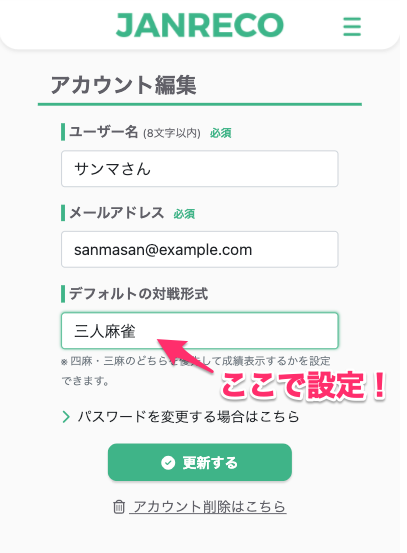
- Press “Update” to save your choice.
- The selected match format will now appear by default.
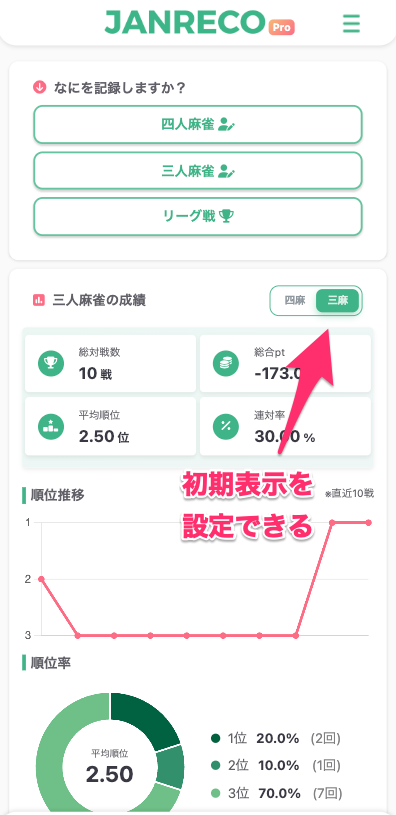
Existing users start with “Four-player mahjong” as their default.
Contact us
If you have any questions, please contact us below.
👉 Contact form
Thank you for using Janreco.